
Python Interview Questions for Data Analysts: The Complete 2026 Guide (105 Questions Across 6 Domains)

Table of Contents
This guide is part of the Finreads Knowledge Excellence Series — practical, expert-curated content for data analysts, BI professionals, and ML candidates. For more interview masterclasses, follow Finreads.
Walking into a data analyst interview, you already know the recruiter will eventually pivot from your résumé to the technical screen and when they do, Python is almost always the first stop. It is the lingua franca of modern analytics, the language behind every notebook, every dashboard pipeline, and every machine learning prototype. If you cannot speak it confidently, the rest of the interview becomes a steep climb.
This guide distills the 105 Python interview questions every data analyst should be ready to answer fluently drawn from real hiring screens at fintech’s, consultancies, product teams, and enterprise BI groups. It is organized exactly the way technical interviewers think: from language fundamentals to data structures, from object-oriented mechanics to Pandas, NumPy, visualization, and the data-prep work that bridges analysis and modeling.
Whether you are preparing for your first analyst role, transitioning from Excel-heavy work into Python driven analytics, or stepping into a senior position that demands fluency across the entire stack, you will find a structured path here. The goal is not memorization — it is building the kind of conceptual clarity that makes you sound experienced under pressure.
Let’s get into it.
Why Python Dominates Data Analyst Interviews in 2026
Python’s grip on the analyst job market has only tightened. There are three reasons interviewers gravitate toward it:
- It is the universal interface. SQL handles storage, R remains strong in statistics, and Excel still owns the boardroom — but Python ties them all together. A modern analyst is expected to pull from a database, clean in Pandas, model in scikit-learn, and visualize in Plotly without leaving the same notebook.
- It tests reasoning, not syntax. Python’s readability lets interviewers focus on how you think. Can you choose the right data structure? Do you understand memory implications? Can you write vectorized code instead of slow loops?
- It scales with the role. The same language that powers a one-off ad-hoc analysis also powers production ETL, dashboards, and ML pipelines. Hiring managers want analysts who can grow into that scope.
That is why Python interview questions for data analysts lean heavily on practical fluency rather than computer science trivia. You won’t be asked to reverse a linked list — you’ll be asked how loc differs from iloc, or why ravel() is faster than flatten().
How to Prepare: A Framework for Tackling Python Interview Questions
Before diving into the questions themselves, internalize a simple framework for answering them:
- Define the concept in one sentence. Interviewers want signal that you understand the core idea, not a textbook recitation.
- Explain the mechanic. How does it work under the hood? This is where junior candidates trail off and seniors shine.
- Anchor it in a use case. Tie every answer to a realistic analytics scenario — a time-series dataset, a customer table, a financial model.
- Acknowledge the trade-offs. Every Python choice has a cost. Naming the trade-off signals maturity.
With that in mind, here are the six domains every candidate should master.
Section 1 Core Python Basics: The 20 Foundational Questions
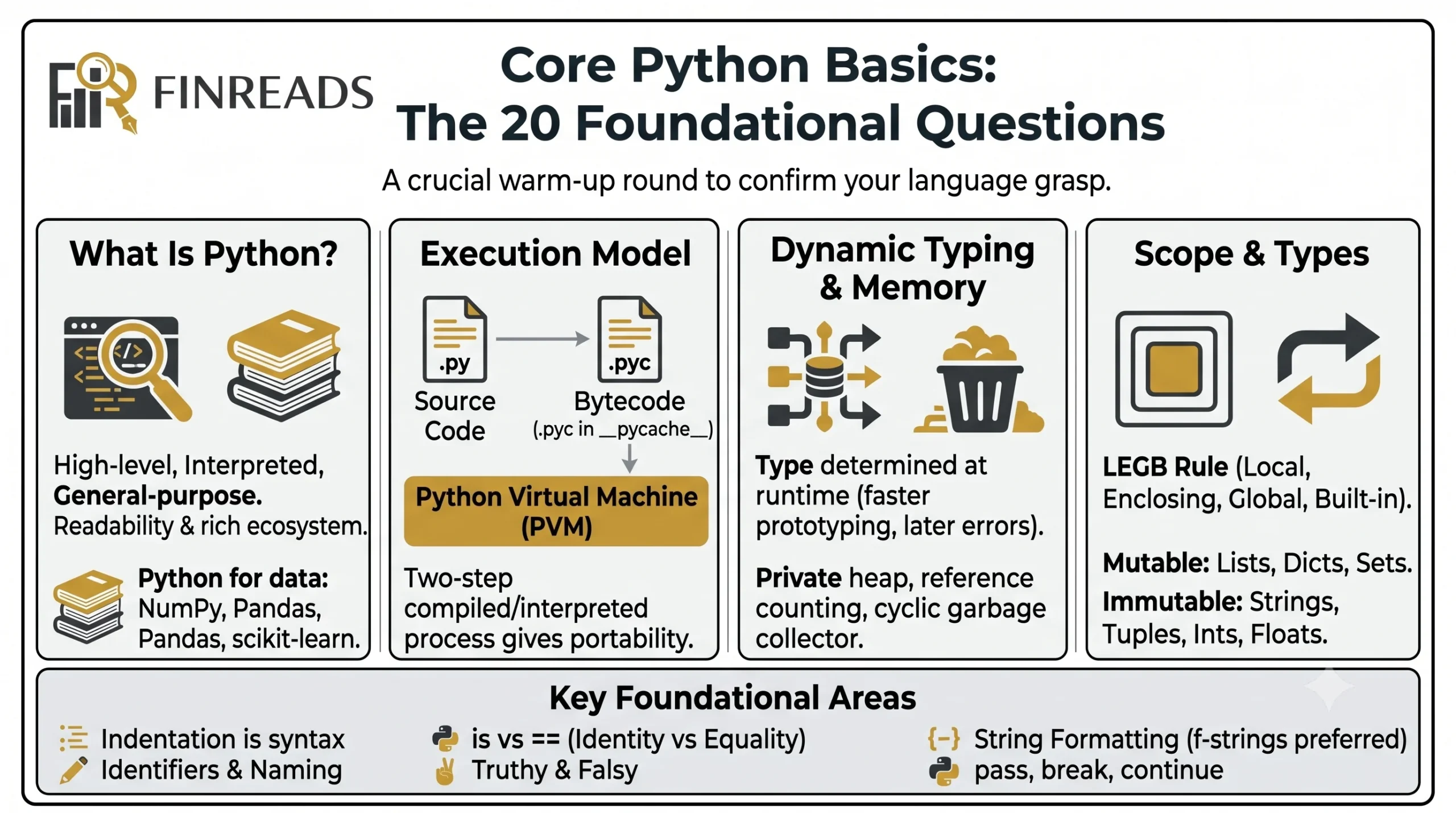
This is the warm-up round. Interviewers use it to confirm you have a clean grasp of the language before they probe deeper. Stumbling here makes the rest of the conversation harder.
What Is Python — and Why Does It Win?
Python is a high-level, interpreted, general-purpose programming language known for its readability and rich ecosystem. For analysts, the killer feature is the data stack — NumPy, Pandas, scikit-learn — which has made it the de facto standard for analysis, science, and ML.
A nuance worth knowing: Python is both compiled and interpreted. Source code is compiled into bytecode (the .pyc files inside __pycache__), and the Python Virtual Machine then interprets that bytecode line by line. This two-step model is what gives Python its portability across operating systems.
Dynamic Typing and Memory Management
Expect a question on dynamic typing. The short version: in Python, the type of a variable is determined at runtime, not compile time. You never declare a type — the interpreter infers it from the value. The trade-off is faster prototyping but type errors that only surface when the offending line actually runs.
You should also be able to describe Python’s memory management: it uses automatic memory management via a private heap, reference counting, and a cyclic garbage collector. The gc module exposes this if you ever need fine control.
Mutable vs Immutable, Scope, and Identifiers
Interviewers love scope questions. Be ready to explain the LEGB rule — Local, Enclosing, Global, Built-in — which is the order Python uses to resolve names. Pair this with a clean answer on the difference between mutable types (lists, dicts, sets) and immutable types (strings, tuples, ints, floats), because that distinction underpins how variables and function arguments behave.
Other foundational topics likely to surface:
- Indentation rules (Python uses whitespace as syntax, not just style)
- Identifiers and naming conventions
- Difference between is and == (identity vs equality)
- Truthy and falsy values
- String formatting (%, .format(), f-strings — modern code overwhelmingly prefers f-strings)
- pass, break, and continue statements
Lock these down first. They are the questions every analyst gets and the questions that interviewers use to set your difficulty curve for the rest of the screen.
Section 2 Data Types and Structures: 15 Questions on Mutability, Speed, and Memory
This section determines whether you have moved past beginner status. Choosing the wrong data structure can make a script 100× slower, and interviewers want to see that you understand why.
The Four Core Collections
You should be able to describe the trade-offs between Python’s four primary collection types in a single breath:
- List — ordered, mutable, allows duplicates, fast appends, slow membership tests on large data.
- Tuple — ordered, immutable, slightly faster than lists, safe as dictionary keys.
- Set — unordered, mutable, no duplicates, near-constant-time membership tests, perfect for deduplication.
- Dictionary — key-value mapping, mutable, hash-backed, average O(1) lookups, the workhorse of nearly all Python data work.
Lists vs Arrays vs NumPy Arrays
Be careful here — interviewers will sometimes ask the difference between Python arrays and lists to see if you actually know there is a difference. Arrays (from the array module or NumPy) hold homogeneous elements and store raw values contiguously in memory. Lists hold heterogeneous objects but pay for it with object-reference overhead. In analytics work, NumPy arrays win whenever speed or vector math matters.
Comprehensions Are a Cultural Marker
If you can write a clean list comprehension like [x**2 for x in range(10) if x % 2 == 0], you sound like you’ve written real Python. The same applies to dictionary comprehensions ({x: x**2 for x in range(5)}) and set comprehensions. They are concise, idiomatic, and almost always faster than the equivalent for loop.
Sets, Dicts, and Hashing
A subtle question that trips candidates: why must dictionary keys be hashable? Because Python uses hash tables to deliver constant-time lookups. Only immutable types are hashable by default — that’s why you can’t use a list as a key but can use a tuple.
Also be ready to discuss frozenset (an immutable set), the collections module (Counter, defaultdict, OrderedDict, namedtuple), and shallow vs deep copy semantics. These come up in any senior screen.
Section 3 Functions, OOP, and Advanced Python: 20 Questions That Separate Levels
This is where interviews start to separate junior from intermediate from senior candidates. The fundamentals haven’t changed in years, but the depth interviewers expect has grown.
The self, __init__, and OOP Basics
You should be able to explain in under thirty seconds: self is the conventional first parameter of every instance method, representing the instance itself. It is what gives the method access to the object’s attributes. And __init__ is the constructor, automatically called when a new instance is created, responsible for setting the object’s starting state.
Other OOP topics that come up:
- Inheritance — how a child class extends a parent
- Encapsulation — bundling data and methods together
- Polymorphism — same interface, different implementations
- Abstract base classes — using the abc module to enforce interfaces
Functions as First-Class Objects
A favorite interview question: Can you pass a function as an argument? Yes — functions in Python are first-class objects, which means they can be assigned to variables, stored in lists, and passed around like any other value. Functions that take other functions as input are called higher-order functions, and they are the foundation of map(), filter(), and decorators.
This naturally leads into:
- Lambda functions — anonymous, single-expression functions defined with the lambda keyword. Useful for short callbacks like sorted(data, key=lambda x: x[1]).
- *args and **kwargs — for accepting variable positional and keyword arguments.
- Decorators — functions that wrap other functions to add behavior without modifying source code. Think @functools.lru_cache for memoization.
Generators, Iterators, and Memory
Expect at least one question on generators. The short answer: a generator is a function that uses yield instead of return, producing values lazily one at a time. The killer benefit is memory efficiency — you can iterate over a billion-row dataset without loading it all at once. This makes generators a regular tool in analyst workflows that process large CSVs or stream API responses.
The GIL, Threads, and Multiprocessing
Senior screens almost always ask about the Global Interpreter Lock (GIL) — the mutex that ensures only one thread executes Python bytecode at a time. This is why CPU-bound Python code rarely benefits from threading, and why you reach for multiprocessing (which spawns separate Python processes) when you need true parallelism.
Other advanced topics to be ready for: closures, context managers (with statements), exception handling (try, except, finally), and metaclasses — “classes of classes” that dictate how classes themselves are built (Django’s ORM is the famous example).
Section 4 — Pandas Interview Questions for Data Analysts: 25 Questions on the DataFrame
This is the largest section for a reason. Pandas is the single most important library on a data analyst’s résumé. If you can’t move comfortably through DataFrames, you won’t pass the technical screen at most analytics roles.
Series vs DataFrame — The Foundational Distinction
Start every Pandas discussion with the basics nailed: a Series is a one-dimensional labeled array holding homogeneous data — essentially a single column with an index. A DataFrame is a two-dimensional table of rows and columns, where each column is itself a Series sharing a common row index.
Selecting, Filtering, and Indexing
Expect a dense stretch of questions on indexing. The headline points:
- df[‘column’] vs df.column — bracket notation is safer because it handles names with spaces, special characters, or method-name clashes.
- df.head() and df.tail() — the universal first move when exploring an unfamiliar dataset.
- .loc vs .iloc — .loc is label-based indexing (works with column names, date labels, string indices); .iloc is integer-based positional indexing. Both support Boolean masking, but only .loc lets you slice on meaningful labels.
- Boolean masking — filtering rows with a condition like df[df[‘revenue’] > 1000] is the bread-and-butter of analytical work.
Cleaning, Merging, and Reshaping
These are the day-to-day verbs of analyst work, and Pandas exposes them all:
- df.rename() for renaming columns, df.drop() for removing rows or columns (with the axis argument controlling direction).
- pd.merge() for SQL-style joins (inner, outer, left, right), df.join() for index-aligned joins, and pd.concat() for stacking DataFrames without matching keys.
- df.sort_values() and df.sort_index() for ordering.
- value_counts() — the fastest way to see the distribution of a categorical column.
- The category dtype — a memory-saving trick for low-cardinality string columns that also speeds up grouping and sorting.
Aggregation, Pivot Tables, and GroupBy
This is the heart of analyst work. df.groupby() combined with .agg() is how you apply statistical operations across grouped data — and passing a dictionary to .agg() lets you apply different aggregations to different columns in a single call.
pivot_table() is the programmatic version of an Excel pivot table — define index rows, columns, values, and an aggregation function (default mean). The difference from groupby() is that pivot tables specifically reshape data into a cross-tabulated format, while groupby produces stacked aggregated output. Also, pivot_table() handles duplicate index pairs through aggregation, which the simpler pivot() cannot do.
Missing Data, Time Series, and the Quirks
Two more topics interviewers love:
- Handling missing values. Detect with isnull() or isna(). Remove with dropna(). Impute with fillna() (constant, mean, forward/backward fill) or interpolate() (mathematical estimation). The right choice depends on how much is missing and why.
- SettingWithCopyWarning. This warning appears when Pandas can’t tell whether you’re modifying a view or a copy of a DataFrame. The fix: use explicit .loc[row, col] = value indexing, or call .copy() when you intend to work on an independent slice.
You should also be conversant in reindexing (forcing a DataFrame onto a new index, filling gaps with NaN — invaluable for time-series alignment) and multi-indexing (hierarchical indexes that let you combine, say, (country, year) as a composite key).
Section 5 — NumPy Interview Questions: 15 Questions on the Numerical Engine
If Pandas is the analyst’s interface, NumPy is the engine running underneath it. Almost every analytics library — Pandas included — depends on NumPy arrays for underlying storage. Interviewers test this layer to see if you understand performance.
Why NumPy Arrays Beat Python Lists
This question appears in nearly every interview. The answer: NumPy arrays are densely packed in contiguous memory, strictly homogeneous in dtype, and use optimized C code under the hood. The result is typically 10–50× faster than equivalent Python lists for numerical operations, with a far smaller memory footprint because lists store boxed object references.
Vectorization and Broadcasting
Two concepts dominate NumPy interview questions:
- Vectorization — expressing an operation as a single array expression rather than a Python for loop. The work is delegated to pre-compiled C routines that act on whole arrays at once, often 10–100× faster than the loop version. This is the idiomatic style in modern Python analytics.
- Broadcasting — NumPy’s ability to perform arithmetic on arrays of different shapes by virtually “stretching” the smaller array along the missing dimensions, without actually copying memory. The classic example: adding a 1-D row to every row of a 2-D matrix.
Reshaping, Stacking, and Copies
Expect questions on:
- .reshape() — changing array dimensions while keeping the total element count constant. Passing -1 for one dimension lets NumPy infer it.
- flatten() vs ravel() — both return a 1-D version of a multi-dimensional array, but flatten() always returns a new copy, while ravel() returns a view of the original memory when possible. Ravel is faster and uses less memory, but modifying it may also alter the original.
- vstack() vs hstack() — vertical and horizontal stacking, both convenience wrappers around np.concatenate().
- Views vs deep copies — slicing a NumPy array returns a view that shares memory with the original. Use .copy() for a fully independent array.
Linear Algebra, Random Numbers, and Outliers
Senior screens probe these areas:
- Dot product via np.dot(), the @ operator, or np.matmul().
- Matrix inversion via np.linalg.inv(), with a nod that np.linalg.solve() is more numerically stable for solving linear systems.
- Random number generation — modern code uses np.random.default_rng() for reproducibility instead of the legacy module-level functions.
- Outlier detection — the IQR method (values below Q1 − 1.5·IQR or above Q3 + 1.5·IQR) is more robust than the mean ± 3σ approach because the IQR isn’t distorted by the outliers themselves.
Section 6 — Visualization and ML Preparation: 10 Questions That Bridge Analysis and Modeling
This is the final stretch. Interviewers want to see that your work doesn’t stop at clean data — that you can communicate it visually and prepare it for downstream modeling.
The Visualization Library Landscape
Be ready to name and differentiate the four main libraries:
- Matplotlib — the foundational, fully customizable plotting library.
- Seaborn — a statistical visualization layer built on Matplotlib, optimized for clean defaults.
- Plotly — interactive, web-ready, dashboard-friendly.
- Bokeh — interactive with a focus on streaming and large datasets.
For exploratory work, Pandas itself exposes a quick df.plot() wrapper around Matplotlib that is often all you need.
Encoding, Scaling, and Cleaning Categories
When your output flows into a model, three preparation steps come up constantly:
- Label encoding — converting strings to integers via pd.Categorical().codes, pd.factorize(), or scikit-learn’s LabelEncoder. Best for ordinal categories.
- One-hot encoding — creating a binary 0/1 column per category using pd.get_dummies() or OneHotEncoder. Best for nominal categories with no natural order.
- Normalization vs standardization. Normalization scales features to a fixed range (commonly [0, 1]) via Min-Max scaling. Standardization transforms features to mean 0 and standard deviation 1 using the Z-score (x − μ) / σ. Standardization is the preferred choice for algorithms assuming Gaussian-like inputs, including linear regression and PCA.
You should also be prepared to discuss handling inconsistent categories (“USA”, “U.S.A.”, “United States” all meaning the same thing) using standardization rules, regex cleanup, or external mapping tables.
Skewness, Leakage, and Visualization Principles
Three concepts every senior analyst is expected to know:
- Checking skewness — inspect the distribution via histogram or KDE plot, or compute the numeric skewness statistic. Highly skewed data can be remedied by log, square-root, or Box-Cox transformations, by winsorizing extreme values, or by switching to non-parametric metrics like the median.
- Spotting data leakage — when information that wouldn’t realistically be available at prediction time silently influences training. Validate with strict time-based splits and ask whether each feature could truly have been known before the target.
- Evaluating a visualization — Edward Tufte’s data-ink ratio is the proportion of a chart’s ink dedicated to displaying actual data versus decoration. Good charts answer one specific question and pass the squint test from a few feet away.
A final classic question: what is a boxplot? It visualizes a dataset’s distribution through a five-number summary — minimum, first quartile, median, third quartile, maximum — with whiskers and outlier points plotted individually. It is exceptional at identifying outliers and comparing distributions across multiple categories side by side.
Final Tips to Ace Your Python Data Analyst Interview
After the questions themselves, here is the meta-advice that converts technical knowledge into offers:
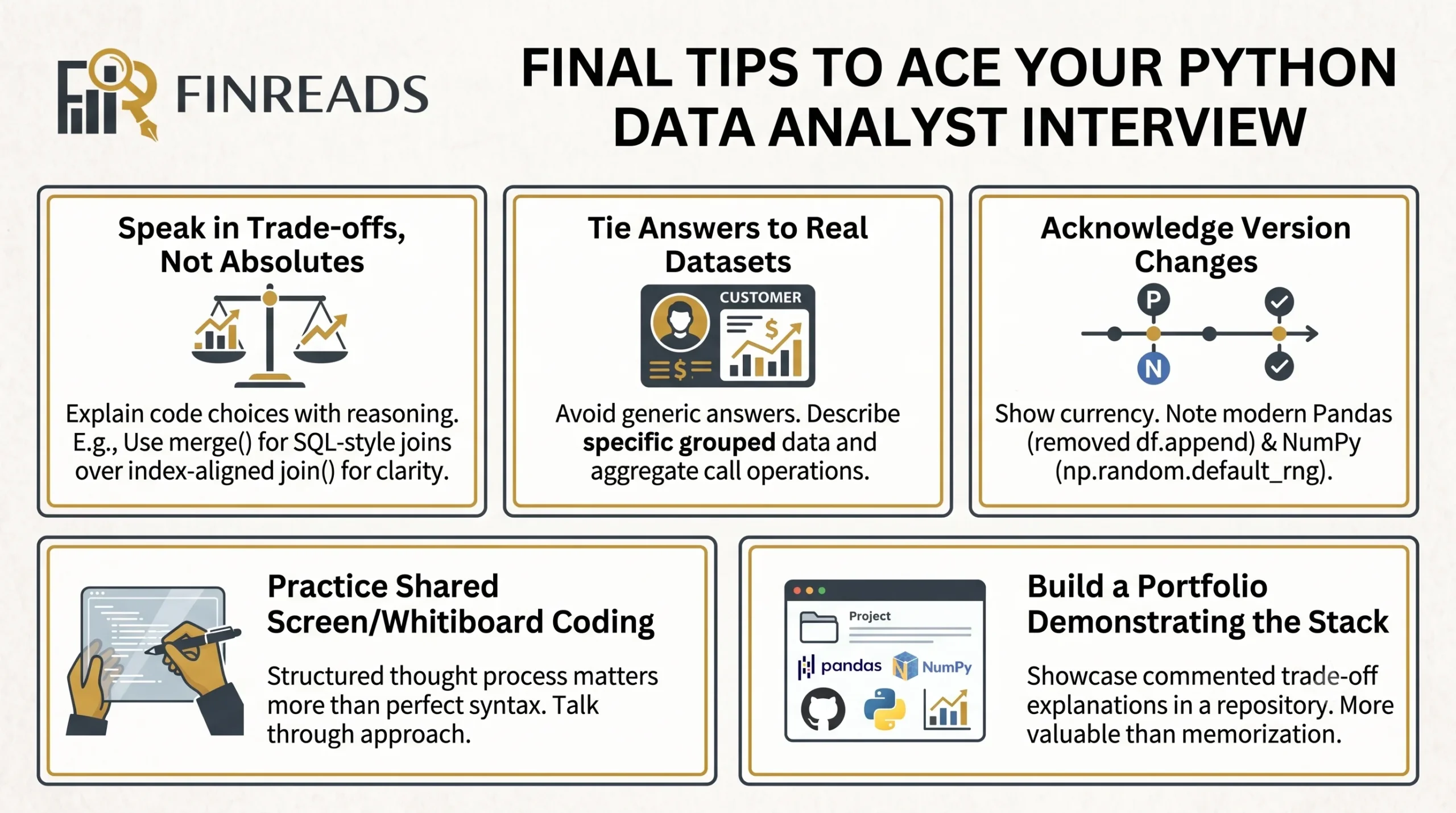
- Speak in trade-offs, not absolutes. “I’d use merge() here because it gives me SQL-style joins, but if I were aligning on indices, join() would be cleaner.” That kind of phrasing signals seniority instantly.
- Tie answers to real datasets. Don’t sayPython “you can use groupby().” Say “I’d group customer transactions by region and apply mean to revenue and count to transactions in a single .agg() call.”
- Acknowledge when something has changed. Modern Pandas removed df.append(). Modern NumPy prefers np.random.default_rng(). Showing you know what’s current is a strong signal.
- Practice writing code on a whiteboard or shared screen. Interviewers care less about flawless syntax and more about your structured thought process. Talk through your approach before you type.
- Build a portfolio that demonstrates the stack. A clean GitHub project that uses Pandas, NumPy, and a visualization library — with comments explaining trade-offs — is worth a hundred memorized answers.
Conclusion: From Questions to Confidence
The 105 questions in this guide are not a wishlist — they are the actual surface area of a modern Python data analyst interview. Master them, and the technical screen stops being a hurdle and starts being a conversation in which you set the pace.
The path is straightforward:
- Lock down the fundamentals first so you don’t lose points on warm-up questions.
- Build deep fluency in Pandas and NumPy because that’s where most of the interview will live.
- Round it out with OOP awareness, visualization vocabulary, and ML-prep instincts to signal that your work flows naturally into the rest of the data stack.
The candidates who get offers aren’t always the ones who know the most — they’re the ones who can articulate what they know clearly, anchor it in real scenarios, and demonstrate that they understand the trade-offs behind every choice.
If you take one habit away from this guide, let it be this: for every Python concept you study, ask yourself, “When would I actually use this, and what would I use instead?” The candidate who can answer that for every topic on this list isn’t preparing for an interview anymore. They’re preparing to do the job.
Now go open a notebook, load a dataset, and start building the muscle memory. The questions are waiting — and so is the offer.


